Most desk setups put the monitor too low. The screen sits on the desk surface, so you spend the day looking down, and by the afternoon your neck and shoulders feel it. At the same time, the space around the monitor fills with a keyboard, notebooks, a phone and supplies, leaving little room to work.
The Monitor Stand with Storage Rack tackles both problems at once. It lifts the screen closer to eye level and opens up the space underneath it for storage. The result is a more comfortable view and a tidier desk, without any tools or complicated setup.
What sets the monitor stand apart
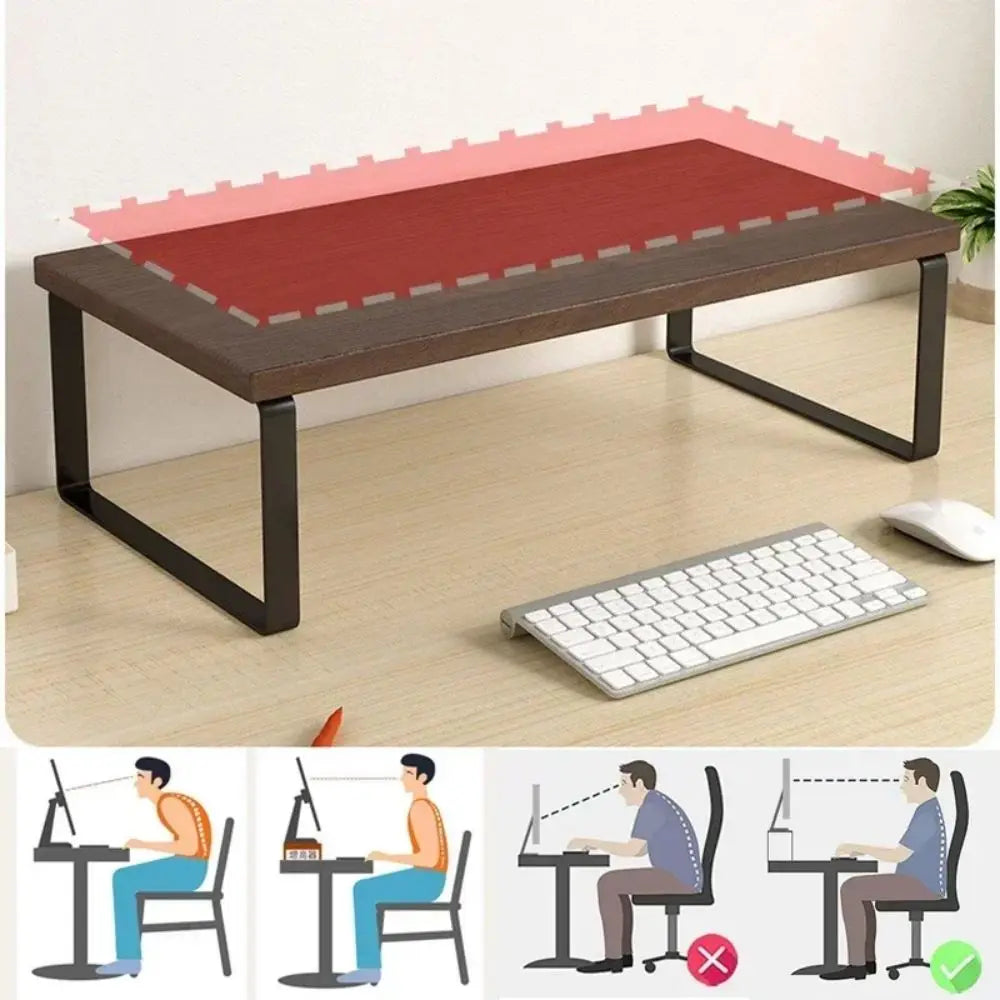
The raised screen is the first advantage. Lifting the monitor brings the top of the display closer to eye level, which takes the strain off your neck over a long working day. It is one of the simplest changes you can make to a desk setup.
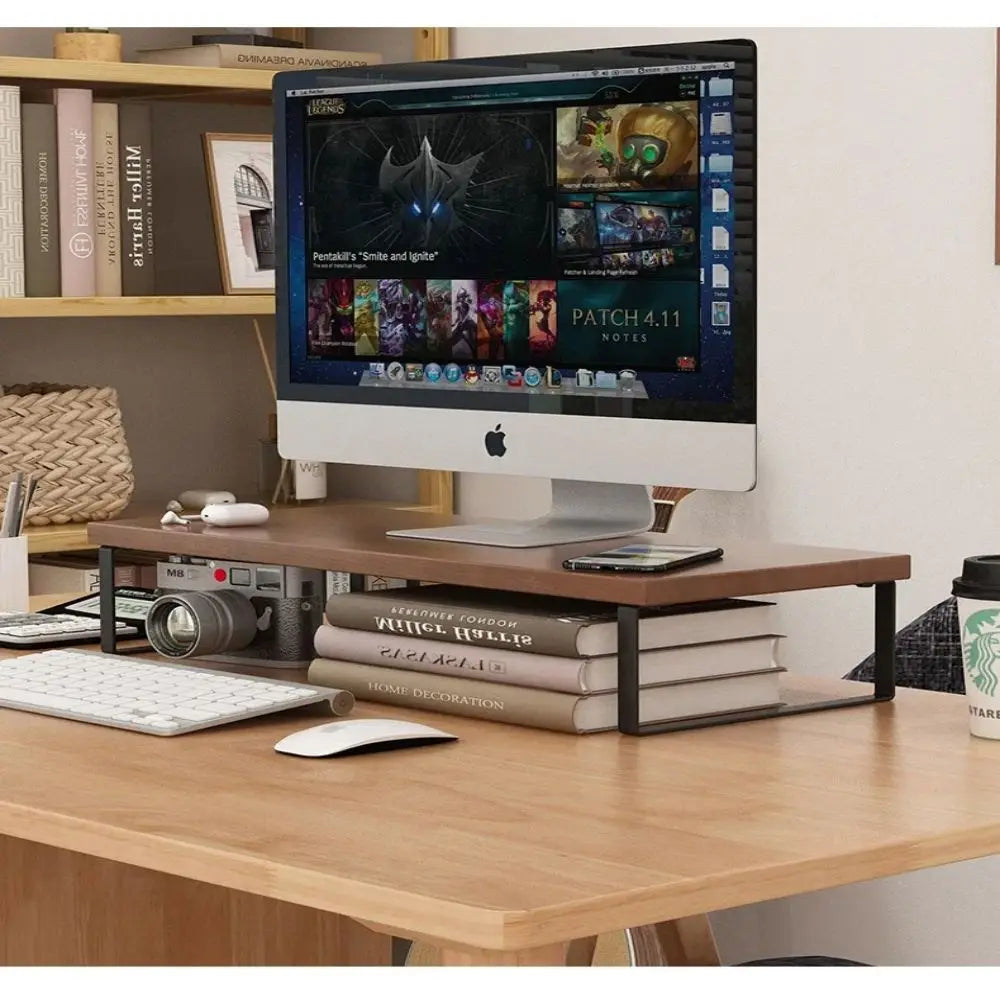
The storage underneath is the second. The open space below the riser holds a keyboard, notebooks, a tablet or desk supplies that would otherwise clutter the surface. When you stand up, the keyboard can slide out of sight, leaving the desk clear.
The simplicity is the third. There is no assembly and nothing is fixed down. Set the stand on the desk, place the monitor on top and it is ready to use, which makes it easy to move or adjust later.
Finally, it is powder coated metal, a clean and sturdy finish that suits home offices and shared workstations alike. The menu lists options including black and white.
Where it looks best, room by room
- Home offices. A raised screen and a tidy desk for long days.
- Shared workstations. A quick way to improve any desk.
- Gaming setups. A monitor lifted with a keyboard stored below.
- Student desks. More room for books and notes.
- Kitchen desks. A laptop or screen raised off a busy counter.
Black suits dark desks, black monitors and a modern workspace, while white blends into a light desk for a clean, bright look.
For a laptop user, the stand can also lift an external monitor to match a laptop on a separate riser, which keeps both screens at a similar height.
On a shared desk, one stand per person gives everyone the same comfortable screen height and their own space underneath.
Choosing the size and placement
The stand measures 15.7 inches long, 7.9 inches deep and 3.1 inches tall. Check the base of your monitor stand against the 15.7 by 7.9 inch top before ordering, and measure the gap underneath against your keyboard.
A few tips help it work its best:
- Center the monitor on the stand so it sits steady.
- Place the stand at the back of the desk, directly in front of your chair.
- Keep the space underneath for items you use daily.
- Run cables behind the stand to keep them tidy.
A good rule of thumb is that the top of the screen should sit roughly at eye level when you sit upright. If your monitor is already tall, the extra lift may be all you need; if it is short, the stand makes a noticeable difference.
Care is simple. Wipe it with a soft, dry cloth, or a damp one for marks, and if the surface gets wet, dry it immediately to protect the finish. Slight color variation between the photos and the item you receive is normal.
Keep the storage area tidy. A small tray or box underneath for pens and cables stops the space from becoming another cluttered corner.
For people who work from home, the stand also helps mark the start and end of the working day. Keyboard out in the morning, keyboard tucked away in the evening, and the desk feels like part of the home again.
If the desk sits against a window, place the stand so the screen is at a right angle to the glass where possible, which cuts glare and makes the raised screen easier to read.
Check the cables reach comfortably once the monitor is raised, since lifting the screen can pull short leads tight.
Pairing it with other pieces
A monitor stand looks best as part of a considered desk. A desk lamp with a soft shade, a small plant and a tidy cable tray make the workspace calm and comfortable. Good light reduces eye strain as much as screen height does.
Browse the display racks collection for more desk organizers, or the table lamps collection for a lamp to light your desk.
A small plant or a framed photo beside the stand keeps the raised screen from dominating the desk, and softens a workspace that is used for long hours.
Because nothing is fixed down, the stand is also easy to lift aside when the desk needs a thorough clean.
Is the monitor stand right for your space?
This stand is a strong fit if you:
- Want your screen closer to eye level.
- Need somewhere to put the keyboard when you step away.
- Like a setup with no tools and no fixings.
- Want a simple metal finish that suits most desks.
It may not be the right choice if your monitor base is larger than the top, or if you need an adjustable height stand. An adjustable arm or riser will suit those better.
Every order ships free across the US and most arrive in 6 to 9 business days. Unused items in their original packaging can be returned within 30 days of delivery, and questions about sizes are answered at info@norafurnish.com.